Advertisement
Keeping your electronic devices in good working order is very important. Even with premium manufacturers like Apple's high-quality products, things can go wrong. That's where your warranty comes in. Apple offers a 1-year Standard warranty on its products from the activation date. If any software and hardware issue comes to your device, you can visit your nearest Apple service centre and get it repaired at no cost. The service quality and experience of the Apple service centres are very premium. They hardly took 1 to 2 hours to solve issues on your device. If you need to remember the activation date of your device and want to know whether your device is still in the warranty period, then this post is for you. This post will clear all your doubts related to the Apple Warranty Check process and steps.
Apple Warranty Check: Methods and Guide
Through Apple Coverage Site
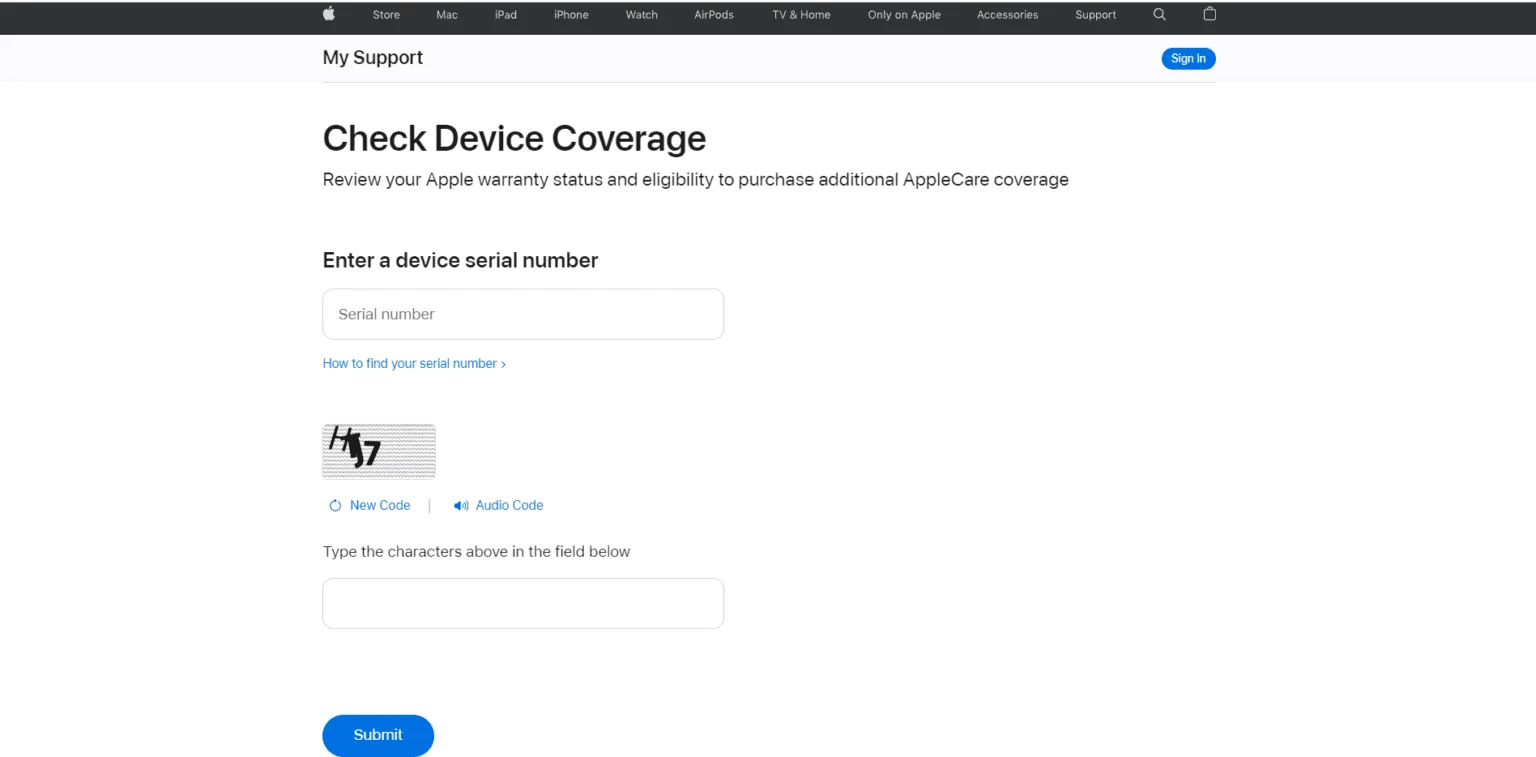
The coverage Method is the easiest method to check the product warranty status of your device. Unlike the other manufacturers, Apple believes in the activation date rather than the date of purchase. Buyers can check the activation date to claim the warranty of any Apple device, including iWatch, iPhone, iPad, and Mac Devices.
Image caption
- First of all, launch Browser on your device and Go to Apple's warranty status page at https://checkcoverage.apple.com/
- Now, enter your Apple device's serial number in the provided field. The serial number can be found on the device's original packaging or by going to Settings > General > About device.
- Then, Fill out the verification form.
- Click on the Continue button.
- On the next screen, You will see warranty support status and coverage,
Using Apple's Support app
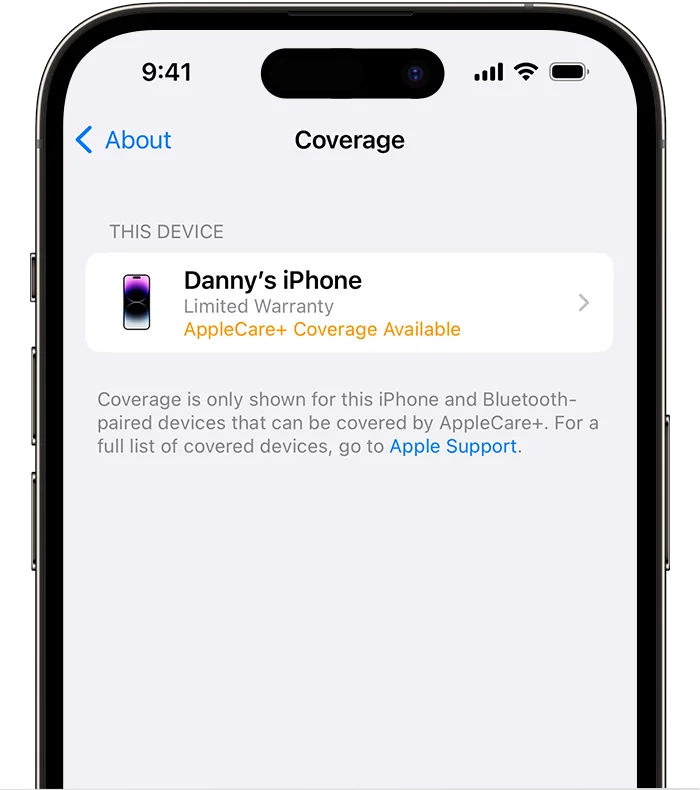
The other easiest method to check the warranty of your device is using a support application. However, this method is limited to iPhones and iPads only.
Image caption
- Launch the app store on your iPhone or iPad.
- Download and install Apple's official Support App.
- After successful installation, Tap on My Devices and select your device.
- Now, Tap on Device Details.
- You will see either Limited Warranty or Coverage Expired in the Coverage Information section in the device details.
How to Check Apple Airpods Warranty
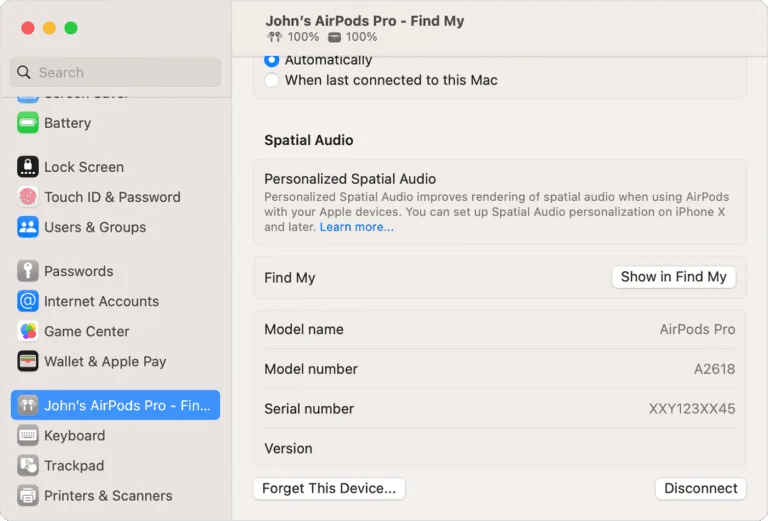
If you have Apple AirPods and need to remember the purchase date or lost the bill, don't worry. Still, you can claim the warranty of your AirPods if it's under the contract. Here's How to Check the warranty status of your Apple AirPods.
Image caption
- First of all, connect your AirPods with your iPhone or iPad.
- After connecting, Launch the Settings app.
- Now you will see your AirPods Device at the top of the settings menu. Tap on it
- Then, you will see a list of information, including a Limited Warranty or expired coverage.
How to check the status of my AppleCare warranty?
Apple also provides extended warranty and accidental damage coverage for its devices. Customers can purchase AppleCare protection plans to insure their devices against accidental damage and theft. If you've bought AppleCare+ protection with your Apple device and want to check its status, follow the steps provided below.- In the first step, launch the browser on your device.
- then Go to the Apple Support Site.
- Now, Sign in with your Apple ID and password.
- Now you will see a list of your devices, Select the device with an active Apple care protection plan.
- On the next screen, you will see all the details of your device's Care+ Protection plan including proof of coverage. (Users need to enable Apple ID with two-factor authentication to see plan proof details).
Faqs
Can I claim an Apple iPhone/iPad warranty without a receipt or Bill?
Yes, you don't need the warranty receipt or bill to claim the Apple product warranty. Unlike many other smartphone manufacturers, Apple service centres don't require your device's receipt for warranty claims. The service centre checks the device's serial number to confirm if it is still under warranty.Does the iPhone have a 1 or 2-year warranty?
The current Apple iPhones come with a standard one-year warranty from Apple worldwide. This global warranty allows you to claim warranty services in any country, regardless of where you purchased the device. This feature is particularly useful for users who frequently travel to foreign countries.What is covered under the Apple iPhone/iPad/iWatch/Mac/Airpods warranty?
Apple's standard warranty covers all manufacturing defects in your devices including hardware and software issues. However, it does not cover damages caused by water or accidents. For protection against accidental damage and water-related issues, you can purchase AppleCare+ separately from Apple.Does the Warranty Cover Crack Display Screen Damages or Scratches?
No, Apple's standard warranty doesn't cover accidental or water damage to the screen; it only covers manufacturer defects. However, you can buy an AppleCare+ plan to protect against screen damage and cracks.Can I buy AppleCare Plus after purchase?
Yes, Users can buy Apple Care Plus Protection even after purchasing their Apple device. However, there is a time limit of up to 60 days after the date of device purchase within this period you can buy the Care+ plan for your iPhone and other Apple devices.what is covered in AppleCare+ for iPhone protection?
Depending upon the plan, Apple Care+ Protection provides repair and replacement of your device. There are different plans in Apple Care+ protection to choose from, if you have chosen AppleCare+ for iPhone, you're covered for unlimited accidental damage. However, there is a fixed fee plus taxes set by Apple to be paid by customers for claiming protection damages. Care+ protection theft or loss plan customers will get all the benefits of AppleCare+ with added protection for up to two cases of theft or loss each year. There are many other plans under the care+ scheme which vary from country to country.How to check Device is covered under the AppleCare plan or Standard Warranty?
Apple has a dedicated coverage checking service that allows its users to check whether their iPhone/iPad/mac is covered under the Apple Care + plan or the standard warranty package. Users can go to this page and enter their device's serial number to check the type of warranty and its expiration date. This service is very helpful for users who have bought the Care+ plan and want to see if it is active on their device or not. We advise users to check the expiration date of their Apple Care+ plan right after purchasing plans.What to do before going to the Apple Service Centre?
Before going to the service centre to fix your device issues, we recommend you take a backup of your device as there is a high chance that all your data may be lost in the repair process. Simply go to Settings > iCloud Backup and create a backup to avoid losing data stored on your device. That's all in this post on Apple Warranty Check. If you need help with any of the steps in the Tutorial Guide, comment below.Advertisement